

How to use WordPress Custom Fields
WordPress gives an author the ability to add extra data to each written post and page. This data is called meta-data and is stored in custom fields.
These fields are really flexible in use and make it possible for developers and theme-authors to create stunning sites, far beyond from normal blog design.
In case you have never noticed it: to access these fields just head over to the write post/page site down to the Advanced Options Tabs. There you will find the Custom Fields Tab which looks something like this:
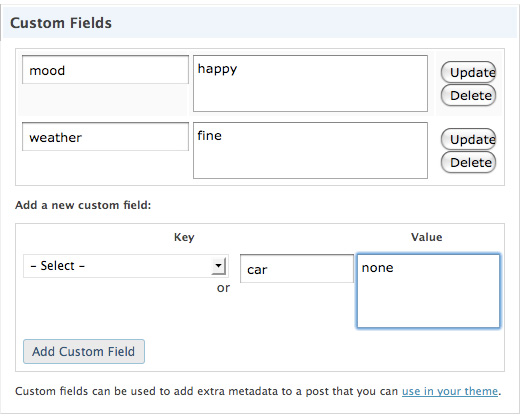
Custom fields consist of two parts: A key and a value.
There are different options to display those fields, the one thing they all got in common: you have to call them inside the loop.
<?php the_meta(); ?>
This is the easiest way to display the data. The template tag automatically puts the entire meta-data into a CSS style called post-meta. The key is in a span called post-meta-key.
All of this is showcased in an unordered list:
<ul class='post-meta'>
<li><span class='post-meta-key'>mood:</span> happy</li>
<li><span class='post-meta-key'>Weather:</span> fine</li>
</ul>
You might want to use these custom informations in a more sophisticated way then displaying unordered lists with your mood and the current weather. Especially if you want to display a post in a way that doesn’t remind the visitor of a typical blog post, custom fields come in very handy.
Just take a look at my porfolio page, or if you want to see a whole site based around custom fields, head over to BestWebGallery. Each post is stuffed with a lot of meta data which is used to display the posts in an unique way.
To display the data in a superior way we use the function
get_post_meta($post_id, $key, $single);
The parameters we need to pass are explained fast:
- $post_id is the ID of the post which stores the meta data. Most of the time it is the current post and we use: $post->ID
- $key is a string containing the name of the meta value you want.
- $single can either be true or false. If set to true then the function will return a single result, as a string. If false, or not set, then the function returns an array of the custom fields.This is needed if you have different $keys with the same name. We will set this to true for our example.
So lets say we have a custom field named “image” which contains the URI to the image:
we could easily display this image the following way:
<?php $image = get_post_meta($post->ID, 'Image', true); ?>

<img src="<?php echo $image; ?>" alt="" />
There are many ways to use custom fields, another one would be to add a different class to some of your posts:
<?php $additional_class = get_post_meta($post->ID, 'class', true); ?>

<div class="my_post <?php echo $additional_class;?> ">
the_content();
</div>
?>
The possibilitys are nearly endless, so let your creative juices flow and enhance your site with custom fields ;)








I´me trying to use custom fields in a new website, however i´d like to know a little thing
Where is that suppose to put those codes?
thanks for your info..i`m still newbie with wordpress..your info help me lot!thanks again
ID, ‘Image’, true); ?>
here ‘Image’, how can i set the image path of uploads folder of wordpress
HI! I need help on how to get the values of the custom fields (all pages) with a search function . Please help..Thanks!
How can I display custom fields on pages? Because It doesn’t work for me…
I just did a custom field to display an image but the only way I was able to code it is… If the cell has something in it then display image… this means it displays the image plus whatever is in the cell. How can you do it to only display the image? (I have the image as a bg for my span)
@Roch you can do this by using this code within the loop:
//—————————————————————————————
$customField = get_post_meta($post->ID,’customFieldName’,true);
if($customField == true){
//Code to display image.
}
//—————————————————————————————
Another useful technique is to learn How to Split and Categorize WordPress’ Custom Field values. The link is below
http://www.graphicbeacon.com/how-to-split-and-categorize-wordpress-custom-field-values/
Very nicely explained. Thanks!
Fantastic!! This had been annoying me for a couple of days!! Thanks for sharing :)
Nice, but how do I get the custom fields of a non-post, that’s to say a page or an attachment???
Thanks for the tutorial. Just working on my first advanced theme and custom fields are awesome.
I absolutely adore your written content and kudos so much for publishing these excellent information and facts.
simple but useful, thanks
Great!! I have made it
tanx a lot!