
WordPress Plugin: My favorite posts
"My favorite posts" is a WordPress plugin which allows logged in users to add posts they like to a private favorite post list.
This post will teach you how to use the plugin.
Current Version: 1.2
Last Update: October 10th 2008
Download
First of all you need do download the zip file, unzip it and place the fav_me.php file at your server at /wp-content/plugins/.
Installation
Installation is rather easy: just activate the plugin, it will create the database table it needs to work on its own.

Using the Plugin
We leave the no-brainer part to learn something interesting now: how to implement the plugin in your theme.
Basically all you need are 2 functions:
- mfp_the_link();
- mfp_display();
mfp_the_link will display an "Add this post to your favorite post list" link wherever you call it. Best practice of course is to add the function anywhere INSIDE your WordPress loop. That will create the add link for each post.
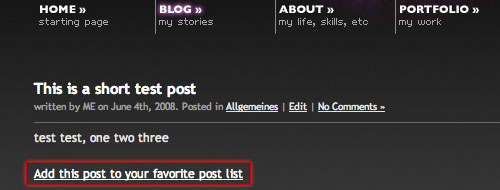
You can pass up to two parameters when calling mfp_the_link().
These are: add_link and remove_link.
The syntax is euqal to many wordpress core functions:
mfp_the_link("add_link=add me please&remove_link=remove me please");
This will replace the default link names with the ones you provide. If you want you can add markup as well:
mfp_the_link("add_link=<span class='add_this'>add me please</span>");
mfp_display will display the list of favorite posts anywhere you like. No WordPress loop required here.
So you can put the list in your sidebar, footer, main content area etc.
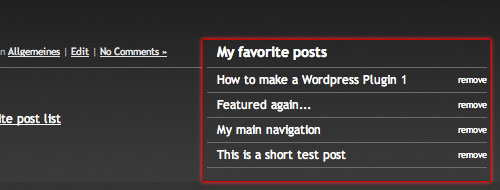
Of course you can pass parameters here as well. Calling the function without parameters will create an unordered list: each list item will contain a link to the post and a "remove link".
The default classes added are:
- ul class: mfp_favorites
- link class: mfp_link
- remove link class: mfp_remove_link
So you don't like my classes? Or you want to display the items in <div> and <p> instead of <ul> and <li>?
Here are the parameters you may change:
- title : Default is no title
- display : Default is "list" -> you may change it to "div"
- remove_link : Text for remove link, Default is "remove"
- class : Class for ul/div , defaul is "mfp_favorites"
- link_class : Class for the post link, default is "mfp_link"
- remove_link_class : Class for remove link, default is "mfp_remove_link"
- order_by : Order of items, default is ID, you can change that to any field name of the wp_posts table: some examples would be "post_title", "post_author", "post_date". Get the full list at the WordPress Codex.
Some examples:
// Add a h3 title
mfp_display("title=<h3>Favorite Posts</h3>")
// Display as Div with different class names
mfp_display("display=div&class=class_1&link_class=class_2");
// Order by post Title & different remove link text
mfp_display("order_by=post_title&remove_link=up up and away");
Another option is to pass the ID of a user to the function. This way it will display another users favorite post list. you can do that by apending the ID as a seperate parameter. The following example would retrieve the posts of user 13 from the database:
mfp_display("order_by=post_title",13);
One of the best options to use this function would be to show it on the authors page of a user. Just insert the ID of the user dynamically ;)
Another option to display the posts is through the widget added in version 1.2.
Thats it. If you encounter any problems, please tell me via contact form or comments. I would also be glad to hear suggestions for improvements, be it in functionality, usability or code wise.
Have a nice day ;)
Version History:
v.1.0: 03.06.2008
v.1.1: 04.06.2008 (major code change, increased flexibility)
v.1.1.1: 10.06.2008 (minor bug fix: broken <a/> tag & php notice)
v.1.2: 10.08.2008 (added widget support and possibility to display other peoples favorite posts)

Responses to “WordPress Plugin: My favorite posts”
Trackbacks
- My favorite Posts WordPress Plugin
- Mis posts favoritos, plugin para Wordpress | aNieto2K
- WP Foundations // Premium & Free WordPress themes for designers » “My Favorite Post” WordPress plug-in
- Mis posts favoritos, plugin para Wordpress « HispaSystem Group Blog
- Plugin: Mis post favoritos | Goldscripts
- Skylog » Blog Archive » links for 2008-06-06
- Review: My Favorite Posts WordPress plugin
- :Wordpress "my favorite posts" eklenti kurulumunda yardým !-TurkForum.Net
- Brève Wordpress Spécial Vacances, 30+ liens utiles et indispensables !
- Recent Project: MatthewGood.org » BraveNewCode
- Sonika’s blog» Ðрхив блога » Добавить в закладки — плагин My favorite posts
- New Store Feature « New York Photo Blog
- My favorite Posts WordPress Plugin : phploop
- tj mapes » Blog Archive » What I’m Reading (weekly)
- Eigene Favoritenliste erstellen mit Wordpress Plugin WP Favorite Posts - Artikel auf gumia.de
- Lage en community side med wordpress - Webforumet.no - Webmaster forum
- 设置wordpressçš„å¤šç”¨æˆ·ç•Œé¢ - MU
- ÌÏíÏ : ÅÖÇÝå ÃÖÝ ÇáÊÏæíäÉ Åáì ãÝÖáÊß ..!
- WordPress Plugin: My favorite posts | Kriesi.at – new media design | WpMash - WordPress News
- links for 2010-02-05 | Aram on Mason
- WordPress – Snipers » Blog Archive » WordPress Plugin: My favorite posts
Great plugin, thanks for sharing it.
I'll test it soon!
That was just the plugin I was looking for !
Works great – Thanks!
Thank you so much, you've made my day!
Nice! I guess the next step is being able to display other users favorites by choice.
Hello,
Is it possible to enable this plugin for no register visitors?
thank you
This is so useful.. thanks a lot!!
Hello Kriesi.
I'm getting a little problem.
I uploaded the plugin and activated it. How can i call it to my singlepost.php for example? I want to show it in the end of each post but i can't get it.
The same for that sidebar show off list.
Can you help please?
Regards,
Paulo
Thanks for the kind words, hope the plugin serves all of you well.
@ adonis: without the login its hard to identify the user and therefore nearly impossible to display the list stored in the database. Only solution I could think of is using cookies to store the data instead of the database, but this would somehow limit the usefulness of the plugin.
Accessing the list from more than one computer would be impossible and whenever the cookie would be deleted the list would be gone as well.
@Paulo: If you want to display the add post link on a single page just write the function call mfp_the_link() in your templates single.php.
And to display the whole list in your sidebar, just place the function call mfp_display() in your sidebar.
Good plugin – I'll probably recommend this plugin as a way to display top posts (inspired by my post Importance of Top posts) from a blog selected by the blog owner itself.
Great plugin! I used the is user logged in function in wordpress to display a link that displays to the user that they must login to add to favorite. :) Thanks!
I cannot get this to work for non-admins. It works perfectly fine when i'm logged in as an admin, but when I log in as a subscriber, [level 0] it doesn't show the 'Add this to my favorite posts' link. Any ideas why?
Hey Frank,
A am afraid, I have no Idea why this problem occurs at your website, since the plugin works fine on every blog I testet it.
Only reason I could think of is another plugin that changes user permissions. What you could try is deactivate all other plugins and see if the link is displayed then.
btw: you got a nice website, i just started watching heroes and love it. Watched Season 1 in a marathon session of 2 days ;D
Great plugin… thanks Kreisi!
The add/remove works great but when I went to put the favorites code I get a php syntax error…
Parse error: syntax error, unexpected '=' in /home/*******/public_html/wp-content/themes/sgrl/single.php on line 12
using code
It only appears to error when calling mfp_display. I run the latest version of wordpress. any ideas or suggestions?
Thanks again :)
… comment strip the php code…
mfp_display(â€display=div&class=class_1&link_class=class_2″);
-or-
mfp_display(â€order_by=post_title&remove_link=up up and awayâ€);
I think the problems are the double quotes. its a strange thing, but WordPress keeps changing them into fancy quote-like characters when I write articles, even if I use the html code. If you don't copy paste the code and instead write it by hand you shouldn't get any errors.
@Kriesi: Ok, i'll try that. It was my next step anyway.
'Heroes' is a great show! Season 2 was ok, but they fell off. Season 3 is looking up every day!
Have you read the 'Heroes' graphic novels? http://www.heroesarg.com/main/archives/archive
Good luck solving the problem.
Haven't read the novels yet, just finished TV Season 2, maybe during the next days =)
Thank you so much for the plugin. I love it!
Question for you. When I'm on a page with multiple posts and I favorite a post towards the bottom. The page refreshes and goes to the top. Is there away to anchor the post?
Thanks again!
Hi Chuck,
I can add this to the to-do list for the next version, seems like a pretty good idea. If you want it here and now, its rather easy to accomplish. Lets say your WordPress loop automatically generates the anchors for each post (id="post-1", id="post-2" etc) as most themes do. Just open the fav_me.php file, and check line 84 and 86. These lines create the add and remove links.
Just change favorite-post=$post_ID to favorite-post=$post_ID#post-$post_ID
same for the second link, and an anchor is added to each add and remove link.
Thanks so much! I just made the changes, works perfectly. BTW, here's the site that I'm using your plugin…
http://foodgawker.com/
One odd thing, when I tried to float:right the add and remove link span or div, the image wasn't clickable in IE, worked fine in FF and Safari. I could see the link in the bottom of the browser on rollover, but couldn't click it. I had to push it right using padding… very odd. But it's either my issue or just typical IE bug. Thanks again.
Very nice work.
Be great if you could get a count of the number of times a post has been made a favourite by all users.
Great plugin, I'm using it at my newly launched site http://coolraker.com as a kind of personal wish list of a reader's favorite items. I also second the request for tracking the number of times a post is added, that would be very useful.
How to display user's favorites on her/his author page with her/his profile? And anyone can see
Really nice plugin.
+1 to "tracking the number of times a post is added"!
cool! i like this one so much!
Thank you so much!
I've been looking for something like this, FOREVER!
Love it!
If you want to see it in action (on a post):
http://s.dahoster.org/110/
In the profile:
http://s.dahoster.org/111/
Thanks again!
A life saver!
All my thought and dreams are crushed…
Ok, so I go to a post to add a favorite, I go to my profile, its there….yay.
but, when I go to another browser (w/o loging in) I don't see any favorites.
But, when I log in again, its there.
(the two browsers are FF and IE)
So, whats the problem? & how do you store the favorites?
Shoot me an email, thanks!
The data is stored in your database and can only be retrieved if you are logged in, since the plugins has to identify which persons favorite posts should be displayed.
Ok, well.
Now I have this other problem.
I really want to show each users favorites, separately.
(On the users profile page).
Right now it shows the favorites of the user that is logged in, not the one whos profile it is.
Do you know whats going on?
With just a bit of code modification used in-conjunction with another plugin I was able to display favorites for a user to everyone on a "themed" user page.
http://www.frugalmate.com/users/admin or http://www.frugalmate.com/users/griff
I'm still working on getting everything done on the site, but I think it could work… If only I could find some time for fun projects like this!
Hey, this is an awesome plug-in. I'm not too PHP savvy but I thought I had it working for the most part until I did the display in my sidebar and got this error above my fav posts.
Warning: Missing argument 1 for mfp_display() in /my/path/to/files/atlprincess.com/html/wp-content/plugins/fav_me.php on line 152
Thanks, Kriesi! It's a great plugin.
Now my members can add games to their favourite list
Hi, I was wondering … and this is a basic one … Do I have to create an area for my members?
Is this something like the structre I need?:
member login page,
Actual logged in page (Where I let users post articles, add to a fav list like this)
thanks
Hey Mobeego or Kriese, mind sharing how to pull this up on a per user basis like the example on frugalmate?
Great plugin, thanks!
Great, respect!
is there a way to show "who did add this post as favourite" I mean the users who added this post as favourite?
Hello Kriesi,
great plugin, thanks.
just a question: is there a way to display a thumbnail of the post with the link and title?
Hi Kriesi,
Thank you fo great plugin. My question is: can I add another bookmarking sites (Russian, Japan for exemple) to this plugin?
is there a way to show author's favourite posts in author.php to everybody???????????
Im agree.
hey Kriesi, thank you very much for the plugin, it works damn good and i found it extremely useful for my site.
anyway, i got 1 quick question – is there some simple way to add number of comments next to the titles in favorites list? it would be just friggin perfect.
Great plugin, man! Thanks a lot!
just made a small update, plugin comes with widget support and the ability to display other persons favorite post list now
Is there a cookie version of none registered users? I would like to add this feature to my site without having to register…
Great plugin. :D
It would be nice to have an option to show separate fav list for different users. If I go to an author's profile, I want to see his fav list, not mine. Is there any way to do this?
Thanks again.
Hi,
I tried `mfp_display("order_by=post_title",13); code but how can I get the author ID? I'm a newbie. Plz help. :)
I tried $author_id but it did not work.
Use the following code:
< ?php
if(isset($_GET['author_name'])) :
$curauth = get_userdatabylogin($author_name);
else :
$curauth = get_userdata(intval($author));
endif;
?>
< ?php mfp_display(order_by=post_title",$curauth->ID);
I got the code for author ID. It's $authordata->ID
Thanks again for this nice plugin. :)
Ops. I just refreshed the page and saw your comment. Ok, I'll add these code.
Thanks again. :D
Hi Kriesi,
The fav list shows only the post title. Is it possible to add post author as well?
For example:
My daily life – Auhtor X
WP Plugins – Author Y
Hi I love this plugin. Thank you. I am not a coder and would like to know if anybody can tell the code for replacing the text for 'add' or 'remove' with a graphic.
very great plugins for wordpresss
Awesome plugin. Thanks!
Hi! Very nice plugin and i am able to use it. But now i need some modification. I ma creating new model website and in every model post there is his profile photo. So, while displaying the favorite model, i want to display their photo and the link. But till now, i am only being able to display the title and link.
Hope to receive your reply soon.
thanks,
sakin
I own a single authored blog so my need would be the ability to favorite some posts to be then shown to the public. There was the old noteworthy but doesn't work and sajid's favourite post ain't working too. So yours is the single one similar, but actually lacks the public displaying. Do you think you're gonna add the feature or maybe I can try to hack yours someway myself?
Thanks. :-)
PS. And maybe also have the ability to show that a post is favorited not only in the side, but directly in the post, with a custom image, a star, for example. Ain't a good idea? :-)
this feature is already implemented. if you would like to display the list of a specific user, just append the id of that user:
mfp_display("order_by=post_title",1);
This would always display the favorite post list of the admin
Edit: you can display this list everywhere, just read the instruction above ;) Adding a little star can easily be done with css since each link get a specific class.
here is an example of the favorite post list on the authors page:
Communizine Theme
Ops, sorry, didn't get that id would work also for non-registered users. Thanks a lot! :-)
Hi Krisei,
about the second thing, I was meaning something slightly different: don't want to display a list somewhere else, just that a post is a favorited one, so it would be something like the thing implemented on mfp_display, but on mfp_the_link function. Adding a show parameter that, if the user ain't logged*, if show is true, if the post is a favorited one, echoes some div classed htmlbunch, so you can put in text or img.
*or maybe, intended for multiusers blogs, a more sophisticated thing like if true and the user ain't the author, something like:
div.class1(htmlbunch a.class2(author))
What about? Do not tell me that this is already implemented or I'm a dumbass! :-)
hi there!
I made with photoshop animated myspace banners.
take a look at them:
http://tinyurl.com/5ajypv
Thank you 4 your site :-) xoxo
Here I am, again.
Got an XHTML validation error Krisei. It's in the if user in the foreach loop that displays the list. That part of code isn't displayed for non logged users (as a validator website) so the closing tag of the entry of the list (or paragraph if div is chosen) is missing. You have to put out of that if the $entry_after:
$fav_post .=$entry_before;
if(…){$fav_post .=…}
$fav_post .=$entry_after;
Now valid. :-)
The plugin works great and Im using it on 1.6.5 wordpress. I have a question though, can this plugin be modiefied with ajax to spice the effects when adding to favorites without refreshing the page and same for removing favorites ? ANYBODY ?
Awesome plugin!
Just a quick Q. Is there a way to display a message in the event that the user hasn't signed in yet? Right now it just appears blank.
Thanks!
hi kriesi,
I congratulate you for the plugin, I am using it on my site. As you can see in action in juanis's page
Two questions:
You can show users who have the same post as a favorite in the sidebar? or users who have marked as a favorite to post the same mine in the author page?
Greetz from Argentina
Juani
Excellent plugin, I congratulate you.
Thank you very much was looking for something like this.
But I agree with the question that Matt iso up.
Is there a way to display a message in the event that the user has not signed in yet?
Happy new year
I think looking to find an answer
http://codex.wordpress.org/Function_Reference/is_user_logged_in
Thanks
Great plugin. I've been looking for something like this for a long time.
I'm using it on my photography store site. Of course everyone has to have some little feature they'd like. For me, it would be to easily show thumbnails in what I call the Wishlist.
P.S. I would like to contribute a few bucks through Paypal for your work on this. Where can I send it.
Best — Dave Beckerman
Super Plugin!!
Does it work with Wordpress 2.7 ???
Thanks
Is there a way to display the posts in the users dashboard?
thank you so much for this! exactly what i was looking for… did the trick and totally painless.
would be nice to be able to output the most popular posts for a specific time period, but of course… not necessary.
Hi! Thank you for the plugin.
One question. This plugin display de fav list of the logged user but… how can I get the fav list of the author page user?? I always get my fav list also if I visit another user page…
Thanks!
Is there a way to have the displayed favorites look like the original post so that it shows the title, date, post, etc… exactly the same way you have it set up in your theme?
Hi, this plugin is awesome!!! Thanks.
hello Kriesi,
nice plugin, i use this plugin, but must be more good.
add in new version funcion of ajax, that will add post to favorite via ajax.
Hi I like the plugin! it is awesome. I am trying to alter it to make it display the posts instead of just the title any ideas I am trying to query_posts(array('post__in'=>array($data))); but it only shows the first post… please help if you have any ideas there may be others who may benefit from this feature
Is possible an user to share the list of favorite with other users?
For example, a member to leave public the access its list of favorite?
So this others can see and to be interested also in those posts.
Thanks.
I was seeking for this kind of plugin for long time. Congrats for this great job!
Hey! I love your plugin–thanks so much for your work on this! I have one question–is there a way to still show the 'Add this post to your favorite post list' link, even if the user isn't logged in, but instead of adding it as a fave, it would link to a login page? I appreciate any help you can give. Thanks!
@Valerie W.
You can add it to an if statement in wordpress:
<?php if (is_user_logged_in()){
mfp_the_link("add_link=Favorite&remove_link=Remove");
}
else {
echo "Favorite";
};
?>
Hello, can somebody help me to make the same effect as http://foodgawker.com/. I mean i have to know how to make new page and there to input this plugin to show me the Fauvorited posts ( With picture and title ).
I will be very thankful. :)
Hi Kriesi,
How about adding an option to add the "Author Profile" as your "Favorite Author"?
Of course, that should be in another add & display functions?
The add "Favorite Author" function will probably be placed on the "Author Page" :D.
And the display "My Favorite Authors" will probably be sitewide (most probably on the "Profile/Author/User Page" :).
@Mobeego — Thanks for the help! I got through that issue successfully.
Now, I'm trying to customize the plugin a bit more, and have it show my post thumbnail instead of just a link to the post. The thumbnail is in a custom field, so I was trying to pull it using get_post_meta(), but that doesn't appear to be pulling anything. I have the mfp_display() function inside the Wordpress Loop on my page, and I'm not getting anything. Can anyone suggest a solution?
Thanks!
@Valerie Wininger – that's an interesting idea… I too have a post image in a custom field. I'll post here if I get anywhere on it.
Hey Kriesi, thanks for the plugin. It's really, really nice and simple.
Question though. Can you pull any more data from the db? I'd like to add the post itself to the favorites, not just a link with the title.
Any help would be greatly appreciated!
JW
You have a great blog here and it is Nice to read some well written posts that have some relevancy…keep up the good work ;)
Le tourment de la présence est pis que celui de l'absence.
Plugin works perfect but I have a question. Many blogs have various categories like videos, jokes, tech etc. When I add a few post to my favorite lists, I can't know which category the post belong. Is there a way to publish the name of the category that post belong?
If your post is only an image, is there a way to display it in the favorites area?
Thanks!
Hi is it possible to display the posts which have been made favourites by the most people.
ie. most favourited
Thanks for this plugin it is great!
I am currently running it on a new site that is running on WordPress MU 2.7.1 and BuddyPress 1.0.1 and it works with no issues.
Quick question. What if you want to display the favorites in a sidebar but the subscriber hasn't "favorited" anything? Is there any way to show a message like "You don't currently have any favorites?"
That would be so helpful so you don't have an header just sitting there with nothing under it.
Hi,
I use your plugin. It's grate. I need put thumb on favorite list. Has anyone now haw to do it ?
Does anyone know how I can create a functionality to either export the contents of the favorites widget or export the contents to an xls file? Thanks!
Hi,
Nice plugin,
I wanted to use it with your theme i bought from themeforest "Design Showcase" , when i activate the plugin i get an error.
Fatal error: Cannot redeclare mfp_install() (previously declared in /home/vhosting/10/tuttoaster.com/www/wp-content/themes/design_showcase/functions.php:515) in /home/vhosting/10/tuttoaster.com/www/wp-content/plugins/fav_me.php on line 61
Please come with a solution, or an update
Kind Regards,
Hein
Hi,
Is there a way to take a user's favorite posts and pass the information to cforms? I'd like to allow users (logged in or anon) to favorite posts, and then send them on to the admin.
Thanks!
Fantastic little plugin. Just getting to grips with it now. In answer to Dawid's Q about adding a thumb – I'd suggest adding a background image to the css of the .add_this class – something like
background: url(../yourimage.gif) no-repeat left center; padding-left:30px;
Great Plugin! Got it working just fine. How difficult would it be to query the post text to display under the title. I created a "favorites" page, and just want to have the post excerpt to go along with the title..
Thanks for the great plugin!
Above all, I wanted to thank you for your " plug in my favorite posts ".
For personal needs, I added a small function which allows to show the favorite posts in the backoffice and add USERS submenu.
I send you my solution which need to be improved.
# ———————————-
# Free Tools – 11/03/2009
# ———————————-
# Add Back Office Users Sub Menu
# ———————————-
add_action('admin_menu', 'mfp_users_submenu');
function mfp_users_submenu() {
add_submenu_page('users.php','Favorite', 'Articles Favoris', 0, __FILE__,'mfp_users_option');
# ———————————-
} # end Menu Back Office
# ———————————-
# ———————————-
# display favorite posts in back office
# ———————————-
function mfp_users_option() {
// Add a h3 title, Order by post Title & different remove link text
mfp_display("title=Articles Favoris &order_by=post_title&remove_link= / retirer des favoris");
# ———————————-
} # end display favorite posts in back office
# ———————————-
# End Free Tools
# ———————————-
thank again for your plug in
Marc
hmmm…i have error message:
Fatal error: Cannot redeclare mfp_install() (previously declared in /customers/xxxxxxx/xxxxxxx/httpd.www/wp-content/themes/design_showcase/functions.php:469) in /customers/xxxxxxx/xxxxxxx/httpd.www/wp-content/plugins/fav_me.php on line 61
can your help me?
great. this plugin rocks!
is there a way to display a custom field and it's content?
cheers, thank you.
Great Job!!!
Not only did your plugin work on WPMU 2.6, but I just decided to switch for wordpress 2.8.5 and it also work like a charm!
Thanks you very much.
is your plugin dynamic enough to be drag and drop favorite
and ofcourse with wordpress i mean
Hi there,
What a fantastic program you have developed. Can I make it display even if the user is not logged in, so that it keeps the favourites in a cookie which is just temporary ?
Kind regards,
Joan
Hi Kriesi,
Thank you for the plugin.
I am using the widget displayed as:
—————-
MY FAVORITE POSTS
Designer Ice at USD8 a sphere!remove
Welcome to The Beloved (temp site)remove
—————-
How do I make a space between the post title and "remove", just like your screen shot above?
Cheers,
Talya
still Compatible to 2.9.1?
2.9 Compatible?
is this plugin is compatible with latest wordpress releasy 2.9.1?
Hi!, What a pefect plugin!
I am from Spain, and I'm having problems with some special characters like "ñ = ñ". The plugin takes the "&" like if it was the next parameter but not. How can I scape the "&"? Do you some way to solve problem?
Thanks!
Hi Kriesi!
Great plugin :)
What are the chances of getting this to store the favorite data within a session or a cookie for unauthenticated users?
I've noticed a couple of requests for this type of feature within these comments already and I think it would be a great addition to this plugin. :)
Thanks, Gaz
I was just sitting down to write this same function, then I found this, Thanks a bunch. Is there any way to just get the IDs out in an array?
I might write in the cookie function, would you like those functions?
Great man! Works just fine